# A tibble: 2 × 2
   line text
  <dbl> <chr>
1     1 The quick brown fox jumps over
2 2 the lazy dog. Tidy Text Mining with {tidytext}
MBG4181 Biyolojik Veri Analizi ve Görüntüleme - Ders6
Alper Yılmaz
2026-11-23
Contents are modified from github.com/juliasilge/tidytext-tutorial
Text as data
Consider the following sentence spanning multiple lines in a book or article.
This is not tidy! How can we count, filter or join external data with this text?
Tidy Data Principles + Text Mining = tidytext
Packages
Tidy text
# A tibble: 9 × 2
   line word
  <dbl> <chr>
1     1 the
2     1 quick
3     1 brown
4     1 fox
5     1 jumps
6     1 over
7     2 the
8     2 lazy
9     2 dog
Now, we have tidy data, one-token-per-row. All functions in dplyr, tidyr are available for complex analysis.
Please go over examples about unnest_tokens() function and find out how to extract letters instead of words
Gathering more data
You can access the full text of many public domain works from Project Gutenberg using the {gutenbergr} package.
# A tibble: 6 × 2
  gutenberg_id text
         <int> <chr>
1          158 "Emma"
2          158 ""
3          158 "by Jane Austen"
4          158 ""
5          158 ""
6 158 "Contents" Note: If gutenberg_download() function time outs then please install the package via devtools::install_github("ropensci/gutenbergr")
For reference, here’s the first 30 lines of Emma by Jane Austen at Gutenberg Project
The Project Gutenberg eBook of Emma, by Jane Austen

This eBook is for the use of anyone anywhere in the United States and
most other parts of the world at no cost and with almost no restrictions
whatsoever. You may copy it, give it away or re-use it under the terms
of the Project Gutenberg License included with this eBook or online at
www.gutenberg.org. If you are not located in the United States, you
will have to check the laws of the country where you are located before
using this eBook.

Title: Emma

Author: Jane Austen

Release Date: August, 1994 [eBook #158]
[Most recently updated: December 14, 2021]

Language: English


Produced by: An Anonymous Volunteer and David Widger

*** START OF THE PROJECT GUTENBERG EBOOK EMMA ***


Emma

by Jane Austen
Your turn
Please browse Project Gutenberg site and locate ID (EBook-No.) of your favorite book. Then extract the full text.
Tidying the whole book
Adding line numbers is optional, it might be helpful for various calculations.
Rows: 161,113
Columns: 3
$ gutenberg_id <int> 158, 158, 158, 158, 158, 158, 158, 158, 158, 158, 158, 15…
$ line         <int> 1, 3, 3, 3, 6, 8, 8, 9, 9, 10, 10, 11, 11, 12, 12, 13, 13…
$ word <chr> "emma", "by", "jane", "austen", "contents", "volume", "i"…| gutenberg_id | line | word |
|---|---|---|
| 158 | 1 | emma |
| 158 | 3 | by |
| 158 | 3 | jane |
| 158 | 3 | austen |
| 158 | 6 | contents |
| 158 | 8 | volume |
Did you notice number of rows? That’s side effect of unnesting.
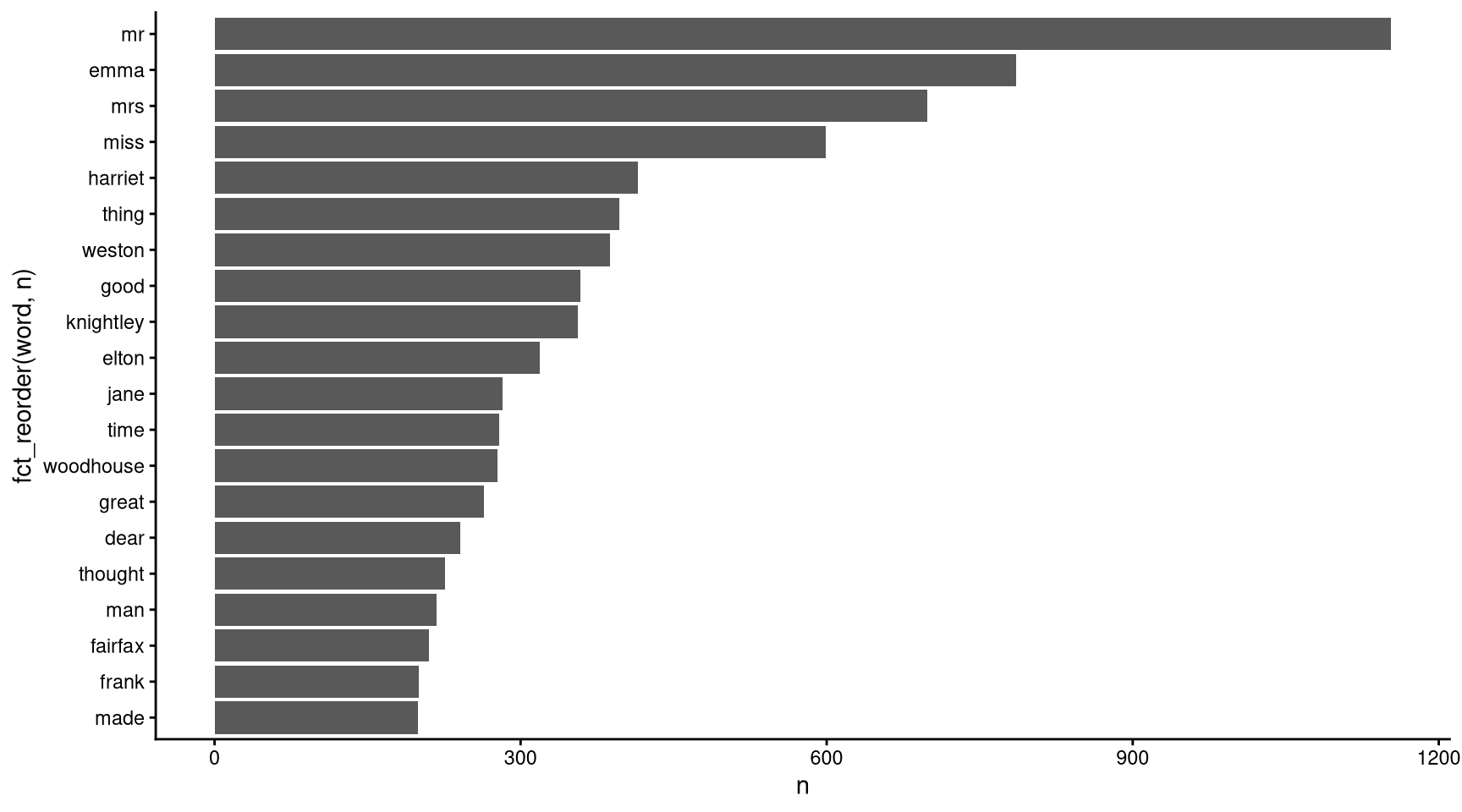
What are the most common words?
# A tibble: 7,360 × 2
   word      n
   <chr> <int>
 1 to     5238
 2 the    5201
 3 and    4896
 4 of     4291
 5 i      3181
 6 a      3125
 7 it     2528
 8 her    2462
 9 was    2398
10 she    2340
# ℹ 7,350 more rows
We have very uninteresting words on top of the list. They are called stop words.
Stop words
If you have loaded {tidytext} package, a data frame called stop_words is loaded as well. However, that data frame is for English only.
Rows: 1,149
Columns: 2
$ word    <chr> "a", "a's", "able", "about", "above", "according", "accordingl…
$ lexicon <chr> "SMART", "SMART", "SMART", "SMART", "SMART", "SMART", "SMART",…
For stop words in other languages you can use {stopwords} package. It contains more sources and languages
Remove stop words
Can you guess what this code will do?
Remove stop words
Sentiment Analysis
Sentiment lexicons
The three general-purpose lexicons are
AFINNfrom Finn Årup Nielsen,bingfrom Bing Liu and collaborators, andnrcfrom Saif Mohammad and Peter Turney.
tidytext provides a function get_sentiments() to get specific sentiment lexicons without the columns that are not used in that lexicon.
Sentiment lexicons
Sentiment lexicons
Sentiment lexicons
Sentiment lexicons
Implementing sentiment analysis
Implementing sentiment analysis
# A tibble: 1,544 × 3
   sentiment word       n
   <chr>     <chr>  <int>
 1 negative  miss     599
 2 positive  well     401
 3 positive  good     359
 4 positive  great    264
 5 positive  like     200
 6 positive  better   173
 7 negative  poor     136
 8 positive  enough   129
 9 positive  happy    125
10 positive  love     117
# ℹ 1,534 more rows
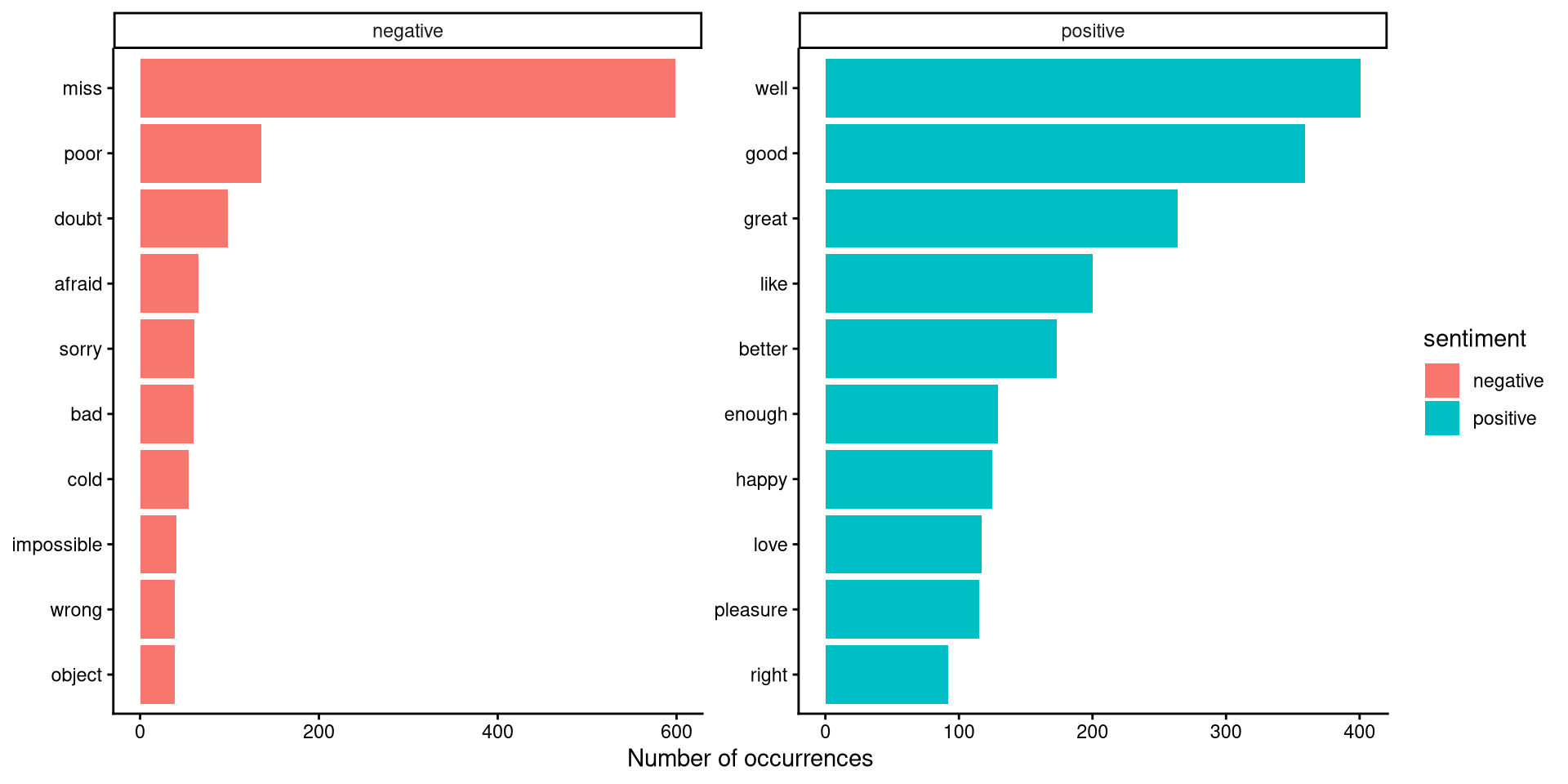
Let’s plot sentiments
tidy_book %>%
    inner_join(get_sentiments("bing")) |>
    count(sentiment, word, sort = TRUE) |>
    group_by(sentiment) |>
    slice_max(n, n = 10) |>
    ungroup() |>
    ggplot(aes(n, fct_reorder(word, n), fill = sentiment)) +
    geom_col() +
    ylab(NULL) +
    xlab("Number of occurrences") +
    facet_wrap(vars(sentiment), scales = "free") +
    theme_classic()
Let’s plot sentiments
Sentiment across book
# A tibble: 73,422 × 3
   text                    book                linenumber
   <chr>                   <fct>                    <int>
 1 "SENSE AND SENSIBILITY" Sense & Sensibility          1
 2 ""                      Sense & Sensibility          2
 3 "by Jane Austen"        Sense & Sensibility          3
 4 ""                      Sense & Sensibility          4
 5 "(1811)"                Sense & Sensibility          5
 6 ""                      Sense & Sensibility          6
 7 ""                      Sense & Sensibility          7
 8 ""                      Sense & Sensibility          8
 9 ""                      Sense & Sensibility          9
10 "CHAPTER 1"             Sense & Sensibility         10
# ℹ 73,412 more rows
austen_sentiment <- austen_books |>
unnest_tokens(word, text) |>
inner_join(get_sentiments("bing")) |>
mutate(index= linenumber %/% 80) |>
count(book, index , sentiment) |>
pivot_wider(names_from = sentiment,
values_from = n,
values_fill = 0) |>
mutate(sentiment = positive - negative)
austen_sentiment# A tibble: 920 × 5
book index negative positive sentiment
<fct> <dbl> <int> <int> <int>
1 Sense & Sensibility 0 16 32 16
2 Sense & Sensibility 1 19 53 34
3 Sense & Sensibility 2 12 31 19
4 Sense & Sensibility 3 15 31 16
5 Sense & Sensibility 4 16 34 18
6 Sense & Sensibility 5 16 51 35
7 Sense & Sensibility 6 24 40 16
8 Sense & Sensibility 7 23 51 28
9 Sense & Sensibility 8 30 40 10
10 Sense & Sensibility 9 15 19 4
# ℹ 910 more rows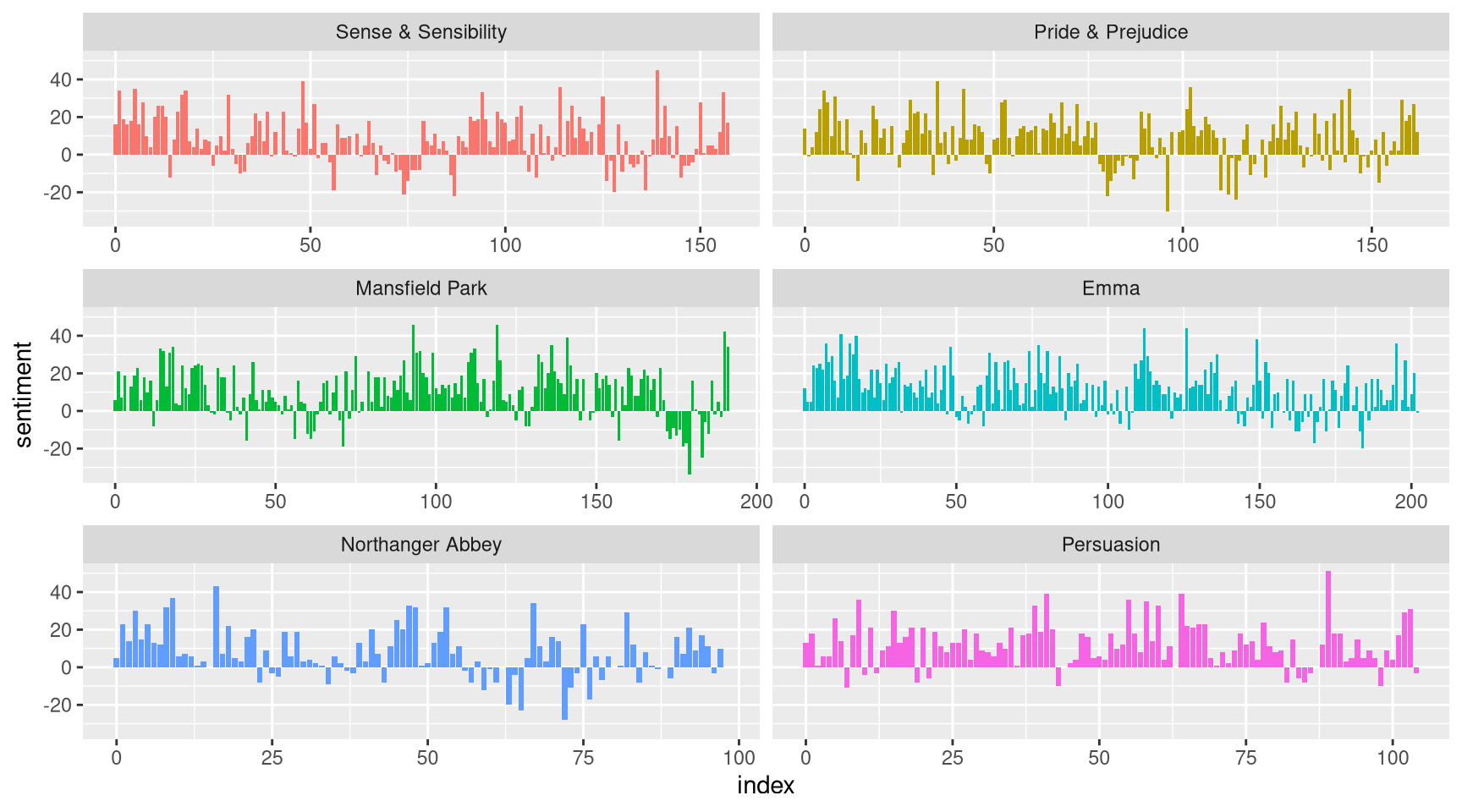
Your turn
- what is the most frequent word in “War and Peace” (gutenberg id=2600)
- count letters in same book, which letters are the most frequent?
- count letters in “Gadsby” (gutenberg id=47342). Did you notice something strange?
All works of Charles Dickens
Downloading all books and running unnest_tokens on them fills up the memory! Let’s process each file separately, clean it and count words for each book then merge the results. Tet’s use purrr::map for this with our custom function
All works of Charles Dickens
This will download and process all_charles_dickens books.
Remember furrr, we have mentioned last week? You can do file processing in parallel if you like.
All works of Charles Dickens
we gathered counts from separate books, so a word is counted multiple times. how can you calculate overall word counts across all books?
TF-IDF
Term frequency
Term frequency (tf), reports how frequently a word occurs in a document. It is possible that some of these words might be more important in some documents than others. A list of stop words is not a very sophisticated approach to adjusting term frequency for commonly used words.
Inserve document frequency
A term’s inverse document frequency (idf), which decreases the weight for commonly used words and increases the weight for words that are not used very much in a collection of documents.
tf-idf
The statistic tf-idf is intended to measure how important a word is to a document in a collection (or corpus) of documents, for example, to one novel in a collection of novels or to one website in a collection of websites.
\[idf(\text{term}) = \ln{\left(\frac{n_{\text{documents}}}{n_{\text{documents containing term}}}\right)}\]
Counting word frequencies
tidytext package has a function called bind_tf_idf() to calculate the TF-IDF. First, let’s prepare counts per book for austen_books.
# A tibble: 40,379 × 3
   book              word      n
   <fct>             <chr> <int>
 1 Mansfield Park    the    6206
 2 Mansfield Park    to     5475
 3 Mansfield Park    and    5438
 4 Emma              to     5239
 5 Emma              the    5201
 6 Emma              and    4896
 7 Mansfield Park    of     4778
 8 Pride & Prejudice the    4331
 9 Emma              of     4291
10 Pride & Prejudice to     4162
# ℹ 40,369 more rows# A tibble: 40,379 × 6
book word n tf idf tf_idf
<fct> <chr> <int> <dbl> <dbl> <dbl>
1 Mansfield Park the 6206 0.0387 0 0
2 Mansfield Park to 5475 0.0341 0 0
3 Mansfield Park and 5438 0.0339 0 0
4 Emma to 5239 0.0325 0 0
5 Emma the 5201 0.0323 0 0
6 Emma and 4896 0.0304 0 0
7 Mansfield Park of 4778 0.0298 0 0
8 Pride & Prejudice the 4331 0.0354 0 0
9 Emma of 4291 0.0267 0 0
10 Pride & Prejudice to 4162 0.0341 0 0
# ℹ 40,369 more rowsThat was not interesting at all..
# A tibble: 40,379 × 6
   book                word          n      tf   idf  tf_idf
   <fct>               <chr>     <int>   <dbl> <dbl>   <dbl>
 1 Sense & Sensibility elinor      623 0.00519  1.79 0.00931
 2 Sense & Sensibility marianne    492 0.00410  1.79 0.00735
 3 Mansfield Park      crawford    493 0.00307  1.79 0.00551
 4 Pride & Prejudice   darcy       373 0.00305  1.79 0.00547
 5 Persuasion          elliot      254 0.00304  1.79 0.00544
 6 Emma                emma        786 0.00488  1.10 0.00536
 7 Northanger Abbey    tilney      196 0.00252  1.79 0.00452
 8 Emma                weston      389 0.00242  1.79 0.00433
 9 Pride & Prejudice   bennet      294 0.00241  1.79 0.00431
10 Persuasion          wentworth   191 0.00228  1.79 0.00409
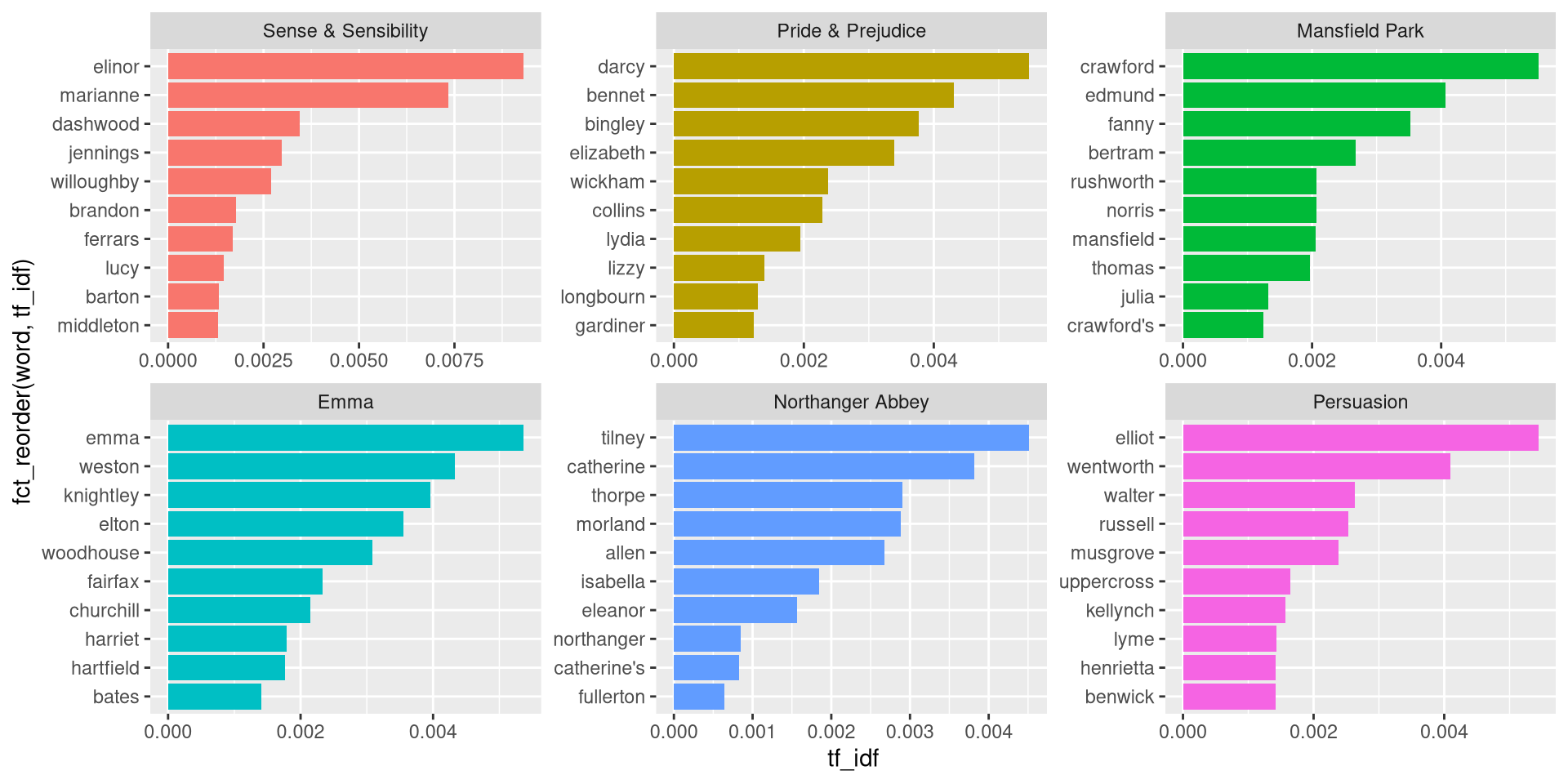
# ℹ 40,369 more rows